> ## Documentation Index
> Fetch the complete documentation index at: https://docs.roboconoxon.org.uk/llms.txt
> Use this file to discover all available pages before exploring further.
# Charging the Battery
> Instructions for safely charging your LiPo battery
## Overview
The exact charger model may vary, but your device should closely resemble the one pictured below:
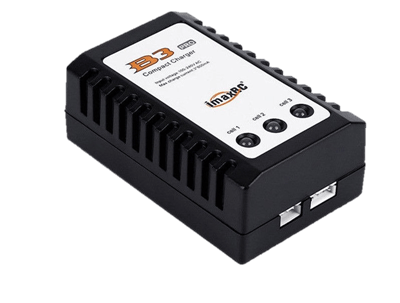 ## Charging Steps
Follow these steps to ensure a safe and efficient charge:
1. **Power On**: Locate the power adapter and plug the charger into the mains. All three LEDs should light up **red**.
2. **Safety Prep**: Place the battery inside the **LiPo-safe bag**, ensuring only the leads protrude from the opening.
3. **Connect**: Identify the **four-pin lead** on the battery.
4. **Plug In**: Connect the battery lead to the four-pin connector on the charger. *Note: These connectors are keyed; do not force the connection.*
**Safety First**
* **Always** charge the battery inside a LiPo-safe bag.
* If you suspect the battery is punctured, swollen, or damaged, **DO NOT** use or charge it.
***
## LED Status Indicators
Monitor the lights on your charger to determine the battery status:
| LED Pattern | Meaning |
| :--------------- | :------------------------------------------------------------------------------------------ |
| **All Green** | Charging complete. |
| **Flashing Red** | **Error:** There is a problem with the battery. Disconnect immediately and contact support. |
## Charging Steps
Follow these steps to ensure a safe and efficient charge:
1. **Power On**: Locate the power adapter and plug the charger into the mains. All three LEDs should light up **red**.
2. **Safety Prep**: Place the battery inside the **LiPo-safe bag**, ensuring only the leads protrude from the opening.
3. **Connect**: Identify the **four-pin lead** on the battery.
4. **Plug In**: Connect the battery lead to the four-pin connector on the charger. *Note: These connectors are keyed; do not force the connection.*
**Safety First**
* **Always** charge the battery inside a LiPo-safe bag.
* If you suspect the battery is punctured, swollen, or damaged, **DO NOT** use or charge it.
***
## LED Status Indicators
Monitor the lights on your charger to determine the battery status:
| LED Pattern | Meaning |
| :--------------- | :------------------------------------------------------------------------------------------ |
| **All Green** | Charging complete. |
| **Flashing Red** | **Error:** There is a problem with the battery. Disconnect immediately and contact support. |